> For the complete documentation index, see [llms.txt](https://docs.heisenware.com/llms.txt). Markdown versions of documentation pages are available by appending `.md` to page URLs; this page is available as [Markdown](https://docs.heisenware.com/app-builder/build-frontend/widgets/input-widgets/form.md).
# Form
The form widget lets you build dynamic, data-driven forms with a wide variety of input types. Configure the layout, create complex field groups, and connect the widget to backend logic to handle submission, validation, and live updates.
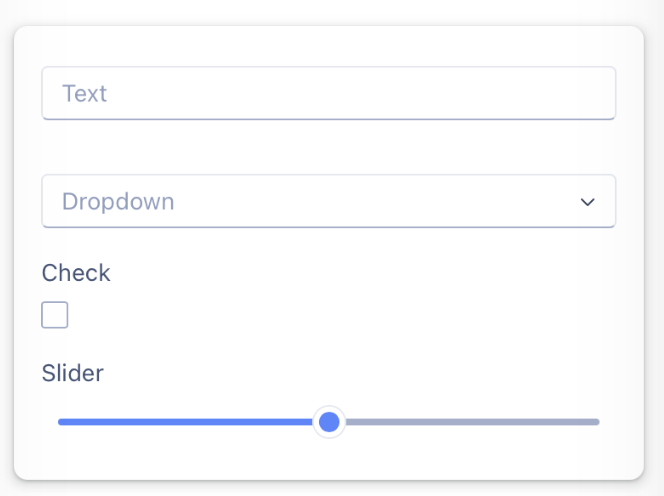
A form with different editor types
## Data binding
### Widget to function input
| **Property** | **Description** | **Type** |
| ------------------ | -------------------------------------------------------------------------------------------------------------------------------------------- | -------- |
| `formData` | Fires whenever any field value changes. The payload is an object holding all current form data. | object |
| `validationResult` | Fires after a `validate` command executes. Contains an object describing the validation outcome with `isValid`, `status`, and `brokenRules`. | object |
### Function output or modifier to widget
| **Property** | **Description** | **Type** |
| ------------ | --------------------------------------------------------------------------------------------------------------------------------------------------------------- | --------------- |
| `autoFill` | Pre-fills the form with the provided data object. The structure must match the `dataField` names. | object |
| `clear` | Clears all data from the form when set to `true`. | boolean |
| `validate` | Triggers form validation when set to `true`. | boolean |
| `readOnly` | Sets the read-only state of the entire form when set to `true`. | boolean |
| `options` | Provides options for `select`, `tags`, or `radioGroup` editors at runtime. The object keys must match the `dataField` of the target editor. | object |
| `addFields` | Adds new fields to the form dynamically. Accepts an array of field objects for a single group, or an object mapping group `dataField` keys to arrays of fields. | array or object |
| `setFields` | Replaces all existing fields with a new set dynamically. Accepts an array of field objects for a single group, or a full group-structure object. | array or object |
### Data structure
#### Autofilling the form (`autoFill`)
To pre-fill the form, pass a YAML object to the `autoFill` property. Its structure must mirror your form configuration.
* **Keys**: Keys in your YAML object must match the `dataField` names defined for each field in the configuration.
* **Nesting**: Nest your YAML object to match if you use form groups with a designated `dataField`. The group's `dataField` becomes the key for a nested object holding that group's fields.
**Example configuration:**
```yaml
# personalInfo/
personalInfo:
firstName: "John"
lastName: "Doe"
# addressInfo/
addressInfo:
street: "123 Main St"
city: "Anytown"
```
The object stays flat if your form configuration uses no groups with `dataField` names:
```yaml
firstName: "John"
lastName: "Doe"
```
#### Setting options at runtime (`options`)
To populate a `select`, `tags`, or `radioGroup` editor at runtime, pass a YAML object to the `options` property.
* **Keys**: Keys of this object must match the `dataField` name of the specific editor you want to update.
* **Values**: The value for each key must be an array of options.
The options in the array support two formats:
1. **Simple array of strings**: Use this format when the display text and the value match. For example: `["Apple", "Banana", "Cherry"]`
2. **Array of key-value pairs**: Use this format when you require different text for display and for the submitted value. Follow the format `["Display Text", "value"]`. For example: `[ ["New York", "NY"], ["California", "CA"] ]`
**Example configuration:**
```yaml
# options/
state:
- [ "New York", "NY" ]
- [ "California", "CA" ]
- [ "Texas", "TX" ]
productTags:
- "New"
- "Best Seller"
- "Clearance"
```
{% hint style="info" %}
#### Extended location field data
When a user selects a place using a `location` editor, the widget adds an extended object to the `formData` payload. The standard field (`dataField`) contains the formatted address string, while a secondary field with an `Ext` suffix (`dataFieldExt`) contains a detailed object with properties like `name`, `address`, `city`, `postcode`, `country`, and `geoJson`.
**Example payload for a location field named `officeAddress`:**
```json
{
"officeAddress": "One Heisenware Way, Silicon Valley, CA 94043, USA",
"officeAddressExt": {
"name": "Heisenware HQ",
"address": "One Heisenware Way, Silicon Valley, CA 94043, USA",
"streetName": "Heisenware Way",
"streetNumber": "1",
"city": "Silicon Valley",
"state": "California",
"country": "United States",
"postcode": "94043",
"placeId": "ChIJ...",
"geoJson": {
"type": "Point",
"coordinates": [37.422, -122.084]
}
}
}
```
{% endhint %}
## Configuration
### Style settings
These properties control the overall appearance and layout of the form widget.
| **Property** | **Label** | **Description** | **Type** |
| --------------------------- | ----------------------------------- | ---------------------------------------------------------------------------------------- | -------- |
| `colCount` | Column count | Sets the number of columns arranging the form items. | integer |
| `labelLocation` | Label location | Controls where field labels sit relative to the editors. | string |
| `labelMode` | Label mode | Defines how labels display, supporting `static`, `floating`, `hidden`, or `outside`. | string |
| `showColonAfterLabel` | Show colon | Adds a colon after each field label when set to `true`. | boolean |
| `initiallyReadOnly` | Initially read-only | Renders the entire form as read-only when it first loads. | boolean |
| `triggerFormDataOnAutoFill` | Trigger form data event on autofill | Automatically triggers an outgoing `formData` event when an `autoFill` command executes. | boolean |
| `fontSizeContent` | Content font size | Sets the font size in pixels for text inside the form fields. | integer |
| `fontSizeLabel` | Label font size | Sets the font size in pixels for the field labels. | integer |
{% hint style="info" %}
#### Screen-specific column layouts
Modify the column count for each screen type separately to display a different number of columns across interfaces. The platform automatically applies other style settings to all screens at once to preserve layout consistency.
{% endhint %}
### Data settings
Define the structure and content of your form by configuring groups and fields.
**Form groups**
Organize your form into one or more groups. With multiple groups, you can optionally display them as tabs.
| **Property** | **Label** | **Description** | **Type** |
| ------------ | ---------------- | --------------------------------------------------------------------------------------- | -------- |
| `dataField` | Group field name | A unique name for the group. On submit, every field in this group nests under this key. | string |
| `label` | Group label | A visible title displayed above the group of fields. | string |
| `tabView` | Tab label | Groups sharing an identical `tabView` label render as tabs within a tab panel. | string |
| `fields` | Fields | An array of field objects belonging to this group. | array |
**Form fields**
Each item in the `fields` array defines an active input editor in your form.
| **Property** | **Label** | **Description** | **Type** |
| ------------ | ----------- | ---------------------------------------------------------------------------- | -------- |
| `dataField` | Field name | A unique name for the field that serves as the key in the form data object. | string |
| `label` | Label | The text label displayed for the field editor. | string |
| `helpText` | Help text | Hint text to guide the user. | string |
| `colSpan` | Column span | The number of columns the field occupies in the layout. | integer |
| `isRequired` | Required | Marks the field as mandatory during form validation. | boolean |
| `disabled` | Disabled | Disables the field to prevent user interaction. | boolean |
| `readOnly` | Read-only | Makes the specific field read-only. | boolean |
| `editor` | Editor type | The input control type to render. Supports sixteen different editor options. | string |
#### Editor types
The `editor` property configuration determines which interface control renders on screen:
| **Editor type** | **Description or value type** |
| --------------- | -------------------------------------------------------------------------------- |
| `text` | Text box, outputs a string value. |
| `select` | Select box, outputs a string selection value. |
| `number` | Number box, outputs a numeric value. |
| `checkbox` | Check box, outputs a boolean value. |
| `password` | Password text box, hides characters and outputs a string value. |
| `tags` | Tag box, outputs an array of selected values. |
| `dateTime` | Date/time select, outputs a serialized date string. |
| `dateRange` | Date range selector, outputs an array containing date spans. |
| `color` | Color select, outputs a hexadecimal color number. |
| `location` | Location select, provides Google Maps autocompletion to output a geojson object. |
| `radioGroup` | Radio button group, outputs a string selection value. |
| `textarea` | Text area field, spans multiple lines and outputs a string value. |
| `slider` | Range slider, outputs a numeric value. |
| `switch` | Binary switch toggle, outputs a boolean value. |
| `calendar` | Inline calendar picker, outputs a selected date value. |
| `edgeConnector` | Specialized dropdown that lists available edge-connector data sources. |
#### Editor-specific configuration options
Configure the specific behavioral parameters of your selected input controllers using the unified options table below.
| **Property** | **Label** | **Description** | **Type** |
| -------------------- | --------------------- | ------------------------------------------------------------------------------------------------------------------------------------------------- | -------------------------- |
| `accentColor` | Use accent color | Applies the global theme accent color style (`text` only). | boolean |
| `min` | Minimum | Sets the minimum allowed numeric boundary value (`number` and `slider` only). | number |
| `max` | Maximum | Sets the maximum allowed numeric boundary value (`number` and `slider` only). | number |
| `defaultValue` | Default value | Defines the initial pre-selected state or fallback content value (`number`, `slider`, `select`, `tags`, `radioGroup`, `switch` only). | string, number, or boolean |
| `prefix` | Prefix | Prepend text formatting before the number string representation (`number` only). | string |
| `suffix` | Suffix | Append text formatting after the number string representation (`number` only). | string |
| `showSeparator` | Show separator | Employs thousands punctuation marks within the text layout representation (`number` only). | boolean |
| `precision` | Precision | Enforces a maximum scale count constraint for floating decimal places (`number` only). | number |
| `step` | Step | Defines the strict adjustment interval stepping sequence increment value (`slider` only). | number |
| `options` | Options | Comma-separated alternative options layout configurations matching the `display:value` pair structure rule (`select`, `tags`, `radioGroup` only). | string |
| `searchEnabled` | Enable searching | Grants interactive textual lookup filters functionality over lists (`select` and `edgeConnector` only). | boolean |
| `showClearButton` | Show clear button | Introduces an interactive clearing icon button utility component structure (`select` only). | boolean |
| `showDropDownButton` | Show drop down button | Toggles structural layout rendering visibility for the dropdown expansion anchor indicator box (`select` and `edgeConnector` only). | boolean |
| `layout` | Layout | Dictates explicit positioning configuration structures, allowing `vertically` or `horizontally` options (`radioGroup` only). | string |
| `switchedOnText` | Switched on text | Overrides text layout representations matching active structural states (`switch` only). | string |
| `switchedOffText` | Switched off text | Overrides text layout representations matching inactive structural states (`switch` only). | string |
| `dateType` | Date type | Configures target structural picker focus formats among `date`, `time`, or `datetime` models (`dateTime` only). | string |
| `locationType` | Location type | Declares target Google Places endpoint filtering scopes matching `address` or `establishment` classifications (`location` only). | string |
---
# Agent Instructions
This documentation is published with GitBook. GitBook is the documentation platform designed so that both humans and AI agents can read, navigate, and reason over technical content effectively. Learn more at gitbook.com.
## Querying This Documentation
If you need additional information that is not directly available in this page, you can query the documentation by asking a question.
Perform an HTTP GET request on the following URL with the `ask` and `goal` query parameters:
```
GET https://docs.heisenware.com/app-builder/build-frontend/widgets/input-widgets/form.md?ask=&goal=
```
`ask` is the immediate question: it should be specific, self-contained, and written in natural language.
`goal` is what the user is ultimately trying to achieve, the reason they need the answer. Sharing it helps GitBook give you a better, more relevant answer. A goal is most helpful when it describes the outcome the user wants rather than restating the question. For example, with `ask=how do I create an API token`, a goal like `automate deployments from our CI pipeline` lets GitBook tailor the answer to that use case.
The response will contain a direct answer to the question and relevant excerpts and sources from the documentation.
Use this mechanism when the answer is not explicitly present in the current page, you need clarification or additional context, or you want to retrieve related documentation sections.