> For the complete documentation index, see [llms.txt](https://docs.heisenware.com/llms.txt). Markdown versions of documentation pages are available by appending `.md` to page URLs; this page is available as [Markdown](https://docs.heisenware.com/app-builder/build-frontend/widgets/display-widgets/value-box.md).
# Value box
The value box widget displays a standalone piece of data. It automatically visualizes text strings, numbers, booleans, complex data structures, or Base64 images in your Apps.
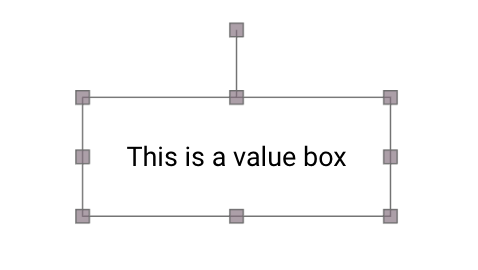
A value box
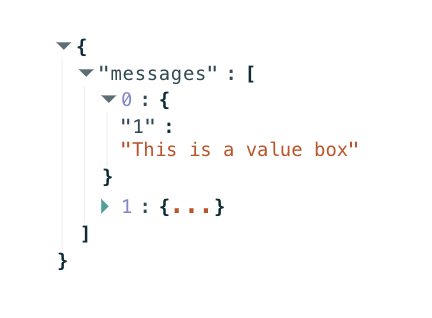
A value box displaying an object
## Data binding
### Function output or modifier to widget
| **Property** | **Description** | **Type** |
| ------------ | ------------------------------------------------------------------------- | ------------------------------------- |
| `value` | Supplies the data payload to be displayed on the widget canvas. | string \| number \| boolean \| object |
| `clear` | Clears the currently displayed value layout when set to `true`. | boolean |
| `textColor` | Programmatically overrides the configured text color property at runtime. | string |
### Widget to function input
| **Property** | **Description** | **Type** |
| ------------ | -------------------------------------------------------------------------------------------------------- | ------------------------------------- |
| `onClick` | Fires when a user clicks the value box container. The payload carries the current underlying data value. | string \| number \| boolean \| object |
### Data formats
The widget inspects the incoming data type of the `value` property and adaptively switches its rendering style:
* **Booleans:** Renders directly as the text string `"true"` or `"false"`.
* **Objects:** Displays inside an interactive, collapsible JSON tree viewer component.
* **Base64 images:** Strings beginning with standard PNG (`iVBORw0KGgo`), JPEG (`/9j/`), or SVG (`PD94bWwgdm`) headers automatically render as visual images scaling to the container boundary.
* **Multiline strings:** Text blocks containing explicit line breaks ( ) split automatically into separate paragraph rows, applying any configured prefix or suffix tokens to each separate line.
* **Non-serializable data:** Tokens matching `__vrpc::not-serializable__` display as `[skipped]`.
## Configuration
Set the widget's defaults in the settings panel.
### General settings
| **Property** | **Label** | **Description** | **Type** |
| ---------------- | -------------------- | ----------------------------------------------------------------------------------------------------------------- | ----------------- |
| `placeholder` | Placeholder | Italicized text string displayed in gray characters when the bound value is null or undefined. | string |
| `format` | Format | Specifies the formatting mask rule applied to numeric measurements or valid date strings. | string |
| `prefix` | Prefix | Text string prepended directly to the front of the displayed value. | string |
| `suffix` | Suffix | Text string appended directly to the trailing end of the displayed value. | string |
| `color` | Text color | Sets the fallback color of the displayed characters. Defaults to the global workspace theme text color when gray. | string |
| `fontSize` | Font size | Sets the size of the text characters in pixels. | integer \| string |
| `fontWeight` | Font weight | Sets the typographical font thickness weight parameter (such as normal, bold, or explicit thickness numbers). | string \| integer |
| `justifyContent` | Horizontal alignment | Aligns the text content horizontally within the container canvas (options include `left`, `center`, or `right`). | string |
| `alignItems` | Vertical alignment | Aligns the text content vertically within the container canvas (options include `top`, `middle`, or `bottom`). | string |
| `width` | Width | Sets the total outer width layout dimension of the widget container block. | string \| number |
| `height` | Height | Sets the total outer height layout dimension of the widget container block. | string \| number |
---
# Agent Instructions
This documentation is published with GitBook. GitBook is the documentation platform designed so that both humans and AI agents can read, navigate, and reason over technical content effectively. Learn more at gitbook.com.
## Querying This Documentation
If you need additional information that is not directly available in this page, you can query the documentation by asking a question.
Perform an HTTP GET request on the following URL with the `ask` and `goal` query parameters:
```
GET https://docs.heisenware.com/app-builder/build-frontend/widgets/display-widgets/value-box.md?ask=&goal=
```
`ask` is the immediate question: it should be specific, self-contained, and written in natural language.
`goal` is what the user is ultimately trying to achieve, the reason they need the answer. Sharing it helps GitBook give you a better, more relevant answer. A goal is most helpful when it describes the outcome the user wants rather than restating the question. For example, with `ask=how do I create an API token`, a goal like `automate deployments from our CI pipeline` lets GitBook tailor the answer to that use case.
The response will contain a direct answer to the question and relevant excerpts and sources from the documentation.
Use this mechanism when the answer is not explicitly present in the current page, you need clarification or additional context, or you want to retrieve related documentation sections.