> For the complete documentation index, see [llms.txt](https://docs.heisenware.com/llms.txt). Markdown versions of documentation pages are available by appending `.md` to page URLs; this page is available as [Markdown](https://docs.heisenware.com/app-builder/build-frontend/widgets/display-widgets/linear-gauge.md).
# Linear gauge
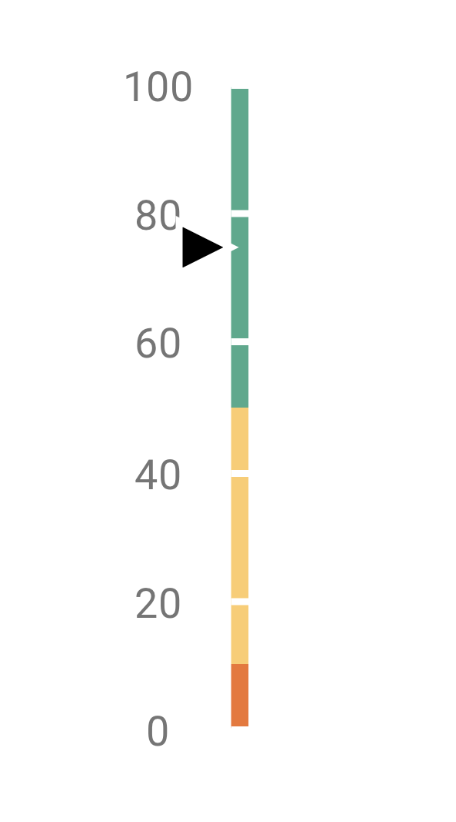
The linear gauge widget displays a single numeric value or a pair of values on a linear scale. It visualizes progress, operational levels, or measurements horizontally or vertically in your Apps.
## Data binding
### Function output or modifier to widget
| **Property** | **Description** | **Type** |
| ------------ | ----------------------------------------------------------------- | -------- |
| `value` | Sets the value for the primary indicator on the gauge. | number |
| `subValue` | Sets the value for the secondary subvalue indicator on the gauge. | number |
## Configuration
Set the widget's defaults in the settings panel.
### Frame
These settings control the main body, structural layout, and orientation of the gauge track.
| **Property** | **Label** | **Description** | **Type** |
| ----------------- | ---------------- | -------------------------------------------------------------------------------------------------- | -------- |
| `orientation` | Orientation | Sets the layout direction of the gauge to vertical or horizontal. | string |
| `width` | Frame width | Sets the thickness of the gauge frame in pixels. | integer |
| `backgroundColor` | Background color | Sets the background color of the gauge range container. | string |
| `ranges` | Color sections | Defines color-coded threshold sections on the gauge frame to represent distinct operational zones. | array |
### Scale
Configure the numeric values, tick increments, and text formatting rules driving the scale context.
| **Property** | **Label** | **Description** | **Type** |
| ------------ | ----------- | -------------------------------------------------------------------- | -------- |
| `startValue` | Start value | The minimum mathematical boundary of the scale. | number |
| `endValue` | End value | The maximum mathematical boundary of the scale. | number |
| `label` | Label | Configuration object governing the scale's numeric text labels. | object |
| `tick` | Major tick | Configuration object governing the primary division tick marks. | object |
| `minorTick` | Minor tick | Configuration object governing the secondary subdivision tick marks. | object |
### Scale label and tick properties
These fields manage text formatting and tick distribution parameters nested inside the `label`, `tick`, and `minorTick` blocks.
| **Property** | **Label** | **Description** | **Type** |
| ------------ | ------------------ | ----------------------------------------------------------------------------------------------------------------------- | -------- |
| `visible` | Display label/tick | Toggles the layout visibility of the respective labels or tick marks. | boolean |
| `size` | Font size | (`label` only) Sets the font text size of the scale labels. | integer |
| `weight` | Font weight | (`label` only) Sets the typographical font thickness weight profile (such as `400` for regular or `700` for bold text). | integer |
| `color` | Font color | (`label` only) Sets the color of the label text. | string |
| `interval` | Interval | (`tick` and `minorTick` only) Sets the mathematical step interval sequence dividing scale marks. | number |
| `length` | Length | (`tick` and `minorTick` only) Sets the total line length of the tick marks in pixels. | integer |
### Indicator
Manage the pointers representing active metrics on the scale track.
| **Property** | **Label** | **Description** | **Type** |
| ------------------- | ------------------ | ---------------------------------------------------------------------------------- | -------- |
| `valueIndicator` | Primary indicator | Configuration object defining the layout style for the main value pointer. | object |
| `subvalueIndicator` | Subvalue indicator | Configuration object defining the layout style for the secondary subvalue pointer. | object |
### Indicator properties
These configuration fields apply inside both the `valueIndicator` and `subvalueIndicator` parent blocks.
| **Property** | **Label** | **Description** | **Type** |
| ----------------- | ------------------------ | ----------------------------------------------------------------------------------------------------------------------------------- | -------- |
| `type` | Indicator type | The pointer layout shape style (options include `Rectangle`, `Rhombus`, `Circle`, `Range Bar`, `Triangle Marker`, or `Text Cloud`). | string |
| `color` | Color | The primary color code used to paint the pointer structure. | string |
| `offset` | Custom distance to gauge | Sets a physical pixel displacement offset air gap between the indicator and the gauge scale line. | number |
| `length` | Length | Sets the structural length dimension of the pointer (or size when using a `Circle`). | integer |
| `width` | Width | Sets the base structural thickness stroke of the pointer. | integer |
| `backgroundColor` | Background color | Sets the background fill color strictly when `type` is configured as a `Range Bar`. | string |
| `size` | Size | Enforces the tracking bar thickness dimension strictly when `type` is configured as a `Range Bar`. | number |
| `arrowLength` | Arrow length | Sets the extension tail structural length when displaying a callout `Text Cloud`. | integer |
---
# Agent Instructions
This documentation is published with GitBook. GitBook is the documentation platform designed so that both humans and AI agents can read, navigate, and reason over technical content effectively. Learn more at gitbook.com.
## Querying This Documentation
If you need additional information that is not directly available in this page, you can query the documentation by asking a question.
Perform an HTTP GET request on the following URL with the `ask` and `goal` query parameters:
```
GET https://docs.heisenware.com/app-builder/build-frontend/widgets/display-widgets/linear-gauge.md?ask=&goal=
```
`ask` is the immediate question: it should be specific, self-contained, and written in natural language.
`goal` is what the user is ultimately trying to achieve, the reason they need the answer. Sharing it helps GitBook give you a better, more relevant answer. A goal is most helpful when it describes the outcome the user wants rather than restating the question. For example, with `ask=how do I create an API token`, a goal like `automate deployments from our CI pipeline` lets GitBook tailor the answer to that use case.
The response will contain a direct answer to the question and relevant excerpts and sources from the documentation.
Use this mechanism when the answer is not explicitly present in the current page, you need clarification or additional context, or you want to retrieve related documentation sections.