> For the complete documentation index, see [llms.txt](https://docs.heisenware.com/llms.txt). Markdown versions of documentation pages are available by appending `.md` to page URLs; this page is available as [Markdown](https://docs.heisenware.com/app-builder/build-frontend/widgets/display-widgets/data-list.md).
# Data list
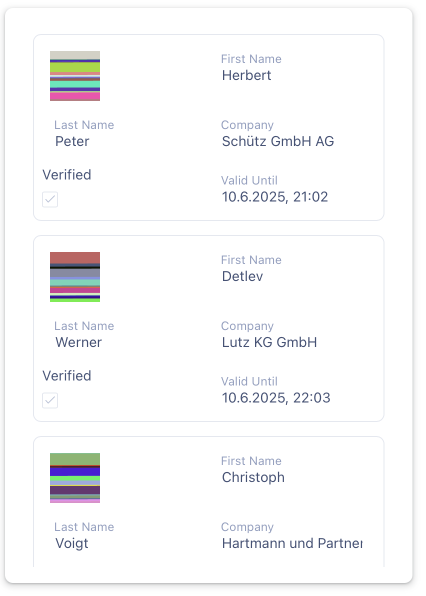
The data list widget displays a collection of data objects inside a scrollable list layout. It renders each record as a mini-form template, letting you view and edit detailed records in a compact space.
|
| `onItemClick` | Fires when a user clicks a list item (only when displaying multiple records), sending the clicked item's data payload. | object |
| `onDelete` | Fires when an item is deleted from the list, sending the unique identifier of the removed item. | string or number |
#### Automatic configuration
Feed data to the widget without defining any parameters in your data fields settings, and it auto-configures itself. It inspects the first record, generates a field for each object property, infers data types (such as `text`, `number`, `dateTime`, or `media`), and populates the data fields panel for further customization.
## Configuration
Set the widget's defaults in the settings panel.
### Appearance
These settings control the typography, spacing, and label layouts inside the list templates.
| **Property** | **Label** | **Description** | **Type** |
| --------------------- | ----------------- | ------------------------------------------------------------------------------------------------------ | ----------------- |
| `colCount` | Column count | Sets the number of columns used to arrange inputs within each item form. Use `0` for automatic layout. | integer or string |
| `labelLocation` | Label location | Controls where to display field labels relative to their input editors (`top`, `left`, `right`). | string |
| `labelMode` | Label mode | Selects label visualization styles (`static`, `floating`, `hidden`, `outside`). | string |
| `showColonAfterLabel` | Show colon | Appends a colon suffix after each visible field label when checked. | boolean |
| `fontSizeContent` | Font size content | Adjusts the typography point text size for input content and editor fields. | integer |
| `fontSizeLabel` | Font size label | Adjusts the typography point text size for field labels. | integer |
| `verticalSpacing` | Vertical spacing | Adjusts the vertical pixel spacing between nested input fields within an item template. | integer |
### Data handling
These settings control the interactive features and payload tracking rules for the list canvas.
| **Property** | **Label** | **Description** | **Type** |
| --------------------- | ----------------------- | ----------------------------------------------------------------------------------------------------------- | -------- |
| `selectionMode` | Selection mode | Selects list item activation capabilities (`single` selection, `multiple` selection checklists, or `none`). | string |
| `allowSearching` | Allow searching | Embeds an integrated search box panel above the list to filter items based on visible data fields. | boolean |
| `allowUpdating` | Allow updating | Lets users modify input fields directly within individual list items inline. | boolean |
| `allowDeleting` | Allow deleting | Exposes interactive removal tools to delete items out of the list layout. | boolean |
| `showAllFieldsOnEdit` | Show all fields on edit | Forces the updated data payload to contain all item properties instead of only modified fields. | boolean |
### Data fields
Map properties from your object array into form items inside the list row templates.
| **Property** | **Label** | **Description** | **Type** |
| ------------ | ------------- | ------------------------------------------------------------------------------------------------------------------------------------------------------------------------------------------------ | -------- |
| `dataField` | Data field | The raw object key mapping path extracted out of the entry dataset. | string |
| `label` | Label | The friendly label text displayed alongside the input field. | string |
| `colSpan` | Column span | The number of layout columns the field occupies within the item grid template. | integer |
| `visible` | Visible | Toggles the layout visibility of this field inside the item template. | boolean |
| `widget` | Editor widget | Dictates the interactive control interface loaded inside the item form (such as `text`, `textarea`, `number`, `slider`, `dateTime`, `dropdown`, `tags`, `checkbox`, `switch`, `color`, `media`). | string |
### Editor widget options
Configure sub-properties nested inside your fields based on your selected `widget` type.
| **Property** | **Label** | **Description** | **Type** |
| ------------------- | -------------------- | ----------------------------------------------------------------------------------------------------------- | ---------------- |
| `min` | Minimum | (`number` and `slider` only) The lowest numeric value bound allowed for entry. | number |
| `max` | Maximum | (`number` and `slider` only) The highest numeric value bound allowed for entry. | number |
| `defaultValue` | Default value | (`number`, `slider`, `dropdown`, `tags` variants) The initial value used inside empty entries. | string or number |
| `precision` | Precision | (`number` only) Caps the maximum count of fixed decimal fraction places shown. | number |
| `currency` | Currency | (`number` only) Prepends currency identifier tags (such as `EUR` or `$`) ahead of values. | string |
| `handleLargeNumber` | Handle large numbers | (`number` only) Downsamples massive integers into condensed unit string variations (such as `1.2M`). | boolean |
| `discover` | Discover options | (`dropdown` and `tags` only) Automatically extracts unique choices directly from historical dataset values. | boolean |
| `options` | Options | (`dropdown` and `tags` only) A comma-separated list mapping hardcoded selection options. | string |
| `switchedOnText` | Switched on text | (`switch` only) The active label text displayed when the toggle is toggled true. | string |
| `switchedOffText` | Switched off text | (`switch` only) The inactive label text displayed when the toggle is toggled false. | string |
| `dateType` | Date type | (`dateTime` only) Adjusts picker depths, choosing between `date`, `time`, or combining into `datetime`. | string |
| `formatDescription` | Format description | (`dateTime` only) Selects specific formatting options driven by preset properties or explicit tokens. | string |
| `isCentralElement` | Is central element | (`media` only) Scales asset displays into massive core preview positions across forms. | boolean |
| `thumbnailSize` | Thumbnail size | (`media` only) Defines the pixel height for preview imagery rendered inside list fields. | integer |
---
# Agent Instructions
This documentation is published with GitBook. GitBook is the documentation platform designed so that both humans and AI agents can read, navigate, and reason over technical content effectively. Learn more at gitbook.com.
## Querying This Documentation
If you need additional information that is not directly available in this page, you can query the documentation by asking a question.
Perform an HTTP GET request on the following URL with the `ask` and `goal` query parameters:
```
GET https://docs.heisenware.com/app-builder/build-frontend/widgets/display-widgets/data-list.md?ask=&goal=
```
`ask` is the immediate question: it should be specific, self-contained, and written in natural language.
`goal` is what the user is ultimately trying to achieve, the reason they need the answer. Sharing it helps GitBook give you a better, more relevant answer. A goal is most helpful when it describes the outcome the user wants rather than restating the question. For example, with `ask=how do I create an API token`, a goal like `automate deployments from our CI pipeline` lets GitBook tailor the answer to that use case.
The response will contain a direct answer to the question and relevant excerpts and sources from the documentation.
Use this mechanism when the answer is not explicitly present in the current page, you need clarification or additional context, or you want to retrieve related documentation sections.