> For the complete documentation index, see [llms.txt](https://docs.heisenware.com/llms.txt). Markdown versions of documentation pages are available by appending `.md` to page URLs; this page is available as [Markdown](https://docs.heisenware.com/app-builder/build-frontend/widgets/display-widgets/circular-gauge.md).
# Circular gauge
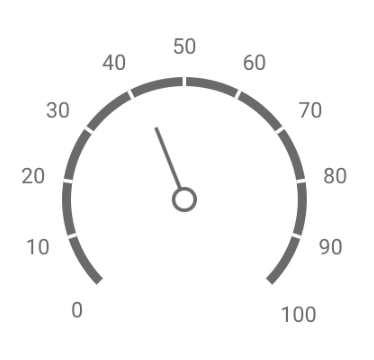
The circular gauge widget displays numeric values and secondary benchmarks on a radial scale. It visualizes measurements, operational progress, or key performance indicators on your dashboards.
## Data binding
### Function output or modifier to widget
| **Property** | **Description** | **Type** |
| -------------------------- | ------------------------------------------------------------------------------------------------- | -------------- |
| `value` | Sets the main indicator pointer value on the radial scale. | number |
| `subValue` | Sets a single secondary value pointer coordinate. If defined, it overrides the `subvalues` array. | number |
| `subvalues` | An array of secondary values to plot multiple subvalue indicators simultaneously. | array\ |
| `disabled` | Toggles whether user interactions and tooltips are disabled. | boolean |
| `containerBackgroundColor` | Sets the solid background fill color of the gauge bounding box. | string |
| `animation` | Configures gauge movement animations, accepting an object with `enabled` and `duration`. | object |
| `tooltip` | Controls contextual hover tooltips, accepting an object with `enabled`. | object |
| `frame` | Overrides the geometry layout, ranges, and background color profiles at runtime. | object |
| `scale` | Overrides scale boundaries, intervals, and labels at runtime. | object |
| `valueIndicator` | Overrides properties for the primary pointer style at runtime. | object |
| `subvalueIndicator` | Overrides properties for the secondary pointer style at runtime. | object |
## Configuration
Set the widget's defaults in the settings panel.
### General settings
| **Property** | **Label** | **Description** | **Type** |
| -------------------------- | -------------------------- | -------------------------------------------------------------------------------------------------- | -------- |
| `containerBackgroundColor` | Container background color | Sets the solid background fill color of the gauge canvas area. | string |
| `disabled` | Disabled | Disables all animations, hover tracking highlights, and tooltips when checked. | boolean |
| `animation` | Animation | Configuration object managing pointer motion, supporting nested `enabled` and `duration` controls. | object |
| `tooltip` | Tooltip | Configuration object managing hover information popups, supporting an `enabled` toggle. | object |
### Frame
These settings control the structural layout and radial architecture of the gauge wheel.
Visual explanation of the properties startAngle and endAngle
| **Property** | **Label** | **Description** | **Type** |
| ----------------- | ---------------- | -------------------------------------------------------------------------------------------------- | -------- |
| `startAngle` | Start angle | The angle in degrees where the gauge scale progression begins. | integer |
| `endAngle` | End angle | The terminal angle profile mapping where the scale progression stops. | integer |
| `width` | Frame width | The line stroke thickness of the circular gauge ring track in pixels. | integer |
| `backgroundColor` | Background color | The background fill color of the frame track container. | string |
| `ranges` | Color sections | An array of threshold range objects used to draw color-coded status warning zones along the frame. | array |
A circular gauge with adjusted frame
### Scale
Configure the numeric values, tick increments, and text formatting rules driving the scale context.
| **Property** | **Label** | **Description** | **Type** |
| ------------ | ----------- | --------------------------------------------------------------- | -------- |
| `startValue` | Start value | The minimum mathematical boundary of the scale. | number |
| `endValue` | End value | The maximum mathematical boundary of the scale. | number |
| `label` | Label | Configuration object governing the numeric text labels. | object |
| `tick` | Major tick | Configuration object governing the primary division ticks. | object |
| `minorTick` | Minor tick | Configuration object governing the secondary subdivision ticks. | object |
### Scale label and tick properties
These fields manage text formatting and tick distribution parameters nested inside the `label`, `tick`, and `minorTick` blocks.
| **Property** | **Label** | **Description** | **Type** |
| ------------ | ----------- | ----------------------------------------------------------------------------------------------------------------------- | -------- |
| `visible` | Visible | Toggles the layout visibility of the respective labels or tick strokes on the wheel. | boolean |
| `size` | Font size | (`label` only) Sets the font text size of the numeric tracking characters. | integer |
| `weight` | Font weight | (`label` only) Sets the typographical font thickness weight profile (such as `400` for regular or `700` for bold text). | integer |
| `color` | Font color | (`label` only) Sets the color of the scale label digits. | string |
| `interval` | Interval | (`tick` and `minorTick` only) The step multiplier interval sequence dividing axis markers. | number |
| `length` | Length | (`tick` and `minorTick` only) The total pixel line length of the tick lines. | integer |
| `width` | Width | (`tick` and `minorTick` only) The line stroke width thickness of the individual tick lines. | integer |
### Indicator
Manage the pointers representing active metrics on the scale wheel.
| **Property** | **Label** | **Description** | **Type** |
| ------------------- | ------------------ | ---------------------------------------------------------------------------------- | -------- |
| `valueIndicator` | Primary indicator | Configuration object defining the layout style for the main value pointer. | object |
| `subvalueIndicator` | Subvalue indicator | Configuration object defining the layout style for the secondary subvalue pointer. | object |
### Indicator properties
These configuration fields apply inside both the `valueIndicator` and `subvalueIndicator` parent blocks.
| **Property** | **Label** | **Description** | **Type** |
| ------------------ | ------------------------------------------------------------------------------------------------- | ----------------------------------------------------------------------------------------------------------------------------------------------------- | -------- |
| `type` | Indicator type | The pointer layout shape style (options include `rectangleNeedle`, `twoColorNeedle`, `triangleNeedle`, `rangeBar`, `triangleMarker`, or `textCloud`). | string |
| `width` | Width | The base structural thickness of the indicator pointer. | integer |
| `offset` | Scale offset | The physical pixel displacement air gap between the pointer and the scale circle line. | number |
| `color` | Color | The primary hex color code used to paint the pointer structure. | string |
| `indentFromCenter` | Indent from center | Dictates center-pin hub clearance parameters for needle pointer styles. | number |
| `spindleSize` | Spindle size | Sets the central anchor core radius when using needle styles. | integer |
| `spindleGapSize` | Spindle gap size | Sets the core interior tracking clearance gap when using needle styles. | integer |
| `secondColor` | Second color | Defines the distinct tip trim color accent when `type` is set to `twoColorNeedle`. | string |
| Second fraction | The proportional length split coordinate determining where the color flips on a `twoColorNeedle`. | number | |
| `size` | Size | Enforces the tracking arc thickness dimension strictly when `type` is configured as a `rangeBar`. | number |
| `baseValue` | Base value | The origin tracking base value from which a `rangeBar` arc grows. | number |
| `length` | Length | Sets the total length factor profile when utilizing a `triangleMarker`. | integer |
| `arrowLength` | Arrow length | Sets the extension tail structural length when displaying a callout `textCloud`. | integer |
---
# Agent Instructions
This documentation is published with GitBook. GitBook is the documentation platform designed so that both humans and AI agents can read, navigate, and reason over technical content effectively. Learn more at gitbook.com.
## Querying This Documentation
If you need additional information that is not directly available in this page, you can query the documentation by asking a question.
Perform an HTTP GET request on the following URL with the `ask` and `goal` query parameters:
```
GET https://docs.heisenware.com/app-builder/build-frontend/widgets/display-widgets/circular-gauge.md?ask=&goal=
```
`ask` is the immediate question: it should be specific, self-contained, and written in natural language.
`goal` is what the user is ultimately trying to achieve, the reason they need the answer. Sharing it helps GitBook give you a better, more relevant answer. A goal is most helpful when it describes the outcome the user wants rather than restating the question. For example, with `ask=how do I create an API token`, a goal like `automate deployments from our CI pipeline` lets GitBook tailor the answer to that use case.
The response will contain a direct answer to the question and relevant excerpts and sources from the documentation.
Use this mechanism when the answer is not explicitly present in the current page, you need clarification or additional context, or you want to retrieve related documentation sections.
.png?alt=media)
.png?alt=media)
.png?alt=media)