> For the complete documentation index, see [llms.txt](https://docs.heisenware.com/llms.txt). Markdown versions of documentation pages are available by appending `.md` to page URLs; this page is available as [Markdown](https://docs.heisenware.com/app-builder/build-backend/functions/utilities/event-simulation.md).

# Event simulation

The event simulation class simulates various events to test and validate workflows. Generating mock events ensures that flows handle different scenarios and edge cases effectively. It also serves as a placeholder in a flow before you complete your App. To learn more about event handlers, see [callbacks](/app-builder/build-backend/functions.md#callbacks).

To access the event simulation functions, unfold Simulation > Events in the Function Explorer. This class requires an instance. The code class name is `Trigger`.

### `create`

Constructs a new event simulation instance.

#### Parameters

None.

#### Output

Returns the name of the created instance.

#### Example

<figure><img src="/files/hQimC1xFOpFPLwQ8xtxm" alt=""><figcaption><p>Create an event simulation instance</p></figcaption></figure>

### `triggerManually`

Triggers a manual event within the instance to activate the `onManualTrigger` listener.

#### Parameters

None.

#### Output

Returns `true`.

### `onManualTrigger`

Fires when you execute the `triggerManually` function within the same instance.

#### Parameters

<table><thead><tr><th width="150">Input</th><th>Description</th><th width="100">Type</th></tr></thead><tbody><tr><td><code>listener</code></td><td>Callback that executes when the manual event triggers. Payload: a UNIX timestamp integer.</td><td>callback</td></tr></tbody></table>

#### Output

Returns the string `subscribed`.

#### Example

<figure><img src="/files/6TmfHkfI3vy23Z346A9F" alt=""><figcaption><p>The listener outputs the timestamp after a manual trigger</p></figcaption></figure>

### `startAutoTrigger`

Starts generating periodic automatic events at a specified interval.

#### Parameters

<table><thead><tr><th width="150">Input</th><th>Description</th><th width="100">Type</th></tr></thead><tbody><tr><td><code>interval</code></td><td>The repetition interval in milliseconds. Default 1000.</td><td>integer</td></tr></tbody></table>

#### Output

Returns the string `started`.

### `onAutoTrigger`

Fires periodically when an automatic trigger is active.

{% hint style="info" %}

#### Initializing the listener

You may need to trigger `onAutoTrigger` once to start reacting to automatically generated events after calling `startAutoTrigger`.
{% endhint %}

#### Parameters

<table><thead><tr><th width="150">Input</th><th>Description</th><th width="100">Type</th></tr></thead><tbody><tr><td><code>listener</code></td><td>Callback that executes when the automatic event triggers. Payload: a UNIX timestamp integer.</td><td>callback</td></tr></tbody></table>

#### Output

Returns the string `subscribed`.

#### Example

<figure><img src="/files/xTlDdSpUX86uqm1LetUF" alt=""><figcaption><p>React periodically to automatic events</p></figcaption></figure>

### `stopAutoTrigger`

Stops the active automatic trigger and halts periodic event generation.

#### Parameters

None.

#### Output

Returns `true`.

#### Example

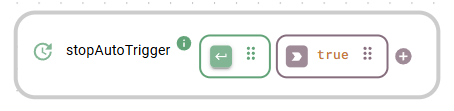
<figure><img src="/files/4AUir9NUyTAjS2fhDNUJ" alt=""><figcaption><p>Stop event generation</p></figcaption></figure>

### `triggerCallback`

Triggers an event that executes its own callback after a specified delay. To prevent infinite loops, the function does not react to the output of its own callback.

#### Parameters

<table><thead><tr><th width="150">Input</th><th>Description</th><th width="100">Type</th></tr></thead><tbody><tr><td><code>listener</code></td><td>Callback that executes after the timeout delay.<br>Payload: a Unix timestamp in milliseconds.</td><td>callback</td></tr><tr><td><code>timeout</code></td><td>The delay duration in milliseconds before the callback executes. Default 3000.</td><td>integer</td></tr></tbody></table>

#### Output

Returns a string stating when the callback will run, for example `Calling back in 3 seconds`.

#### Example

<figure><img src="/files/lC02SOi6zJrgirrNY5M4" alt=""><figcaption><p>Callback execution after a timeout delay</p></figcaption></figure>

### `delete`

Removes the instance and clears its configuration.

{% hint style="danger" %}

#### Irreversible action

Deleting an instance removes its configuration permanently.
{% endhint %}

#### Parameters

None.

#### Output

Returns `true` upon removal.

#### Example

<figure><img src="/files/EcZqb8koLUh8JYGDarjr" alt=""><figcaption><p>Delete an event simulation instance</p></figcaption></figure>


---

# Agent Instructions
This documentation is published with GitBook. GitBook is the documentation platform designed so that both humans and AI agents can read, navigate, and reason over technical content effectively. Learn more at gitbook.com.

## Querying This Documentation
If you need additional information that is not directly available in this page, you can query the documentation dynamically by asking a question.

Perform an HTTP GET request on the current page URL with the `ask` query parameter, and the optional `goal` query parameter:

```
GET https://docs.heisenware.com/app-builder/build-backend/functions/utilities/event-simulation.md?ask=<question>&goal=<endgoal>
```

`ask` is the immediate question: it should be specific, self-contained, and written in natural language.
`goal` is optional and describes the broader end goal you are ultimately trying to accomplish on behalf of the user. GitBook uses it to tailor the answer towards what is most useful for that goal.

The response will contain a direct answer to the question and relevant excerpts and sources from the documentation.

Use this mechanism when the answer is not explicitly present in the current page, you need clarification or additional context, or you want to retrieve related documentation sections.