> For the complete documentation index, see [llms.txt](https://docs.heisenware.com/llms.txt). Markdown versions of documentation pages are available by appending `.md` to page URLs; this page is available as [Markdown](https://docs.heisenware.com/app-builder/build-backend/functions/extensions.md).

# Docker Extensions

Docker Extensions expand platform capabilities using Docker container technology. A Docker Extension is a standard Docker image that the platform loads, executes, and exposes as functions inside the App Builder.

{% hint style="info" %}

#### Docker Extensions versus extension nodes

Docker Extensions add completely new function classes to the platform. Do not confuse them with [extension nodes](/app-builder/build-backend/extension-nodes.md) (modifiers, filters, recorders, and error handlers), which are the small nodes that attach directly to a function output on the canvas.
{% endhint %}

The platform supports two categories of Docker Extensions:

1. **Official extensions**: Pre-built, managed modules maintained by Heisenware.
2. **Custom Extensions**: User-created Docker images containing custom algorithms, drivers, or proprietary logic.

## Official extensions

Pre-built modules add advanced capabilities to the platform without manual coding:

<table><thead><tr><th width="220">Extension</th><th>Description</th></tr></thead><tbody><tr><td><a href="/pages/UEZ2OLoub8DQ4SLIJRP9">Industrial blockchain</a></td><td>Provides immutable data logging and audit trails.</td></tr><tr><td><a href="/pages/gPRuYdWMIpqkpPErq8LX">RAG AI</a></td><td>Enables Retrieval-Augmented Generation for context-aware AI assistants.</td></tr><tr><td><a href="/pages/uuG7Fipc2p1UTkv1svNn">Process simulations</a></td><td>Simulates utilities consumption, CNC machine telemetry, and silo fill levels.</td></tr><tr><td><a href="/pages/DKRT9cAm6tafK1vesdkv">OGC SensorThings API</a></td><td>Manages IoT sensor data via the standardized OGC SensorThings specification.</td></tr></tbody></table>

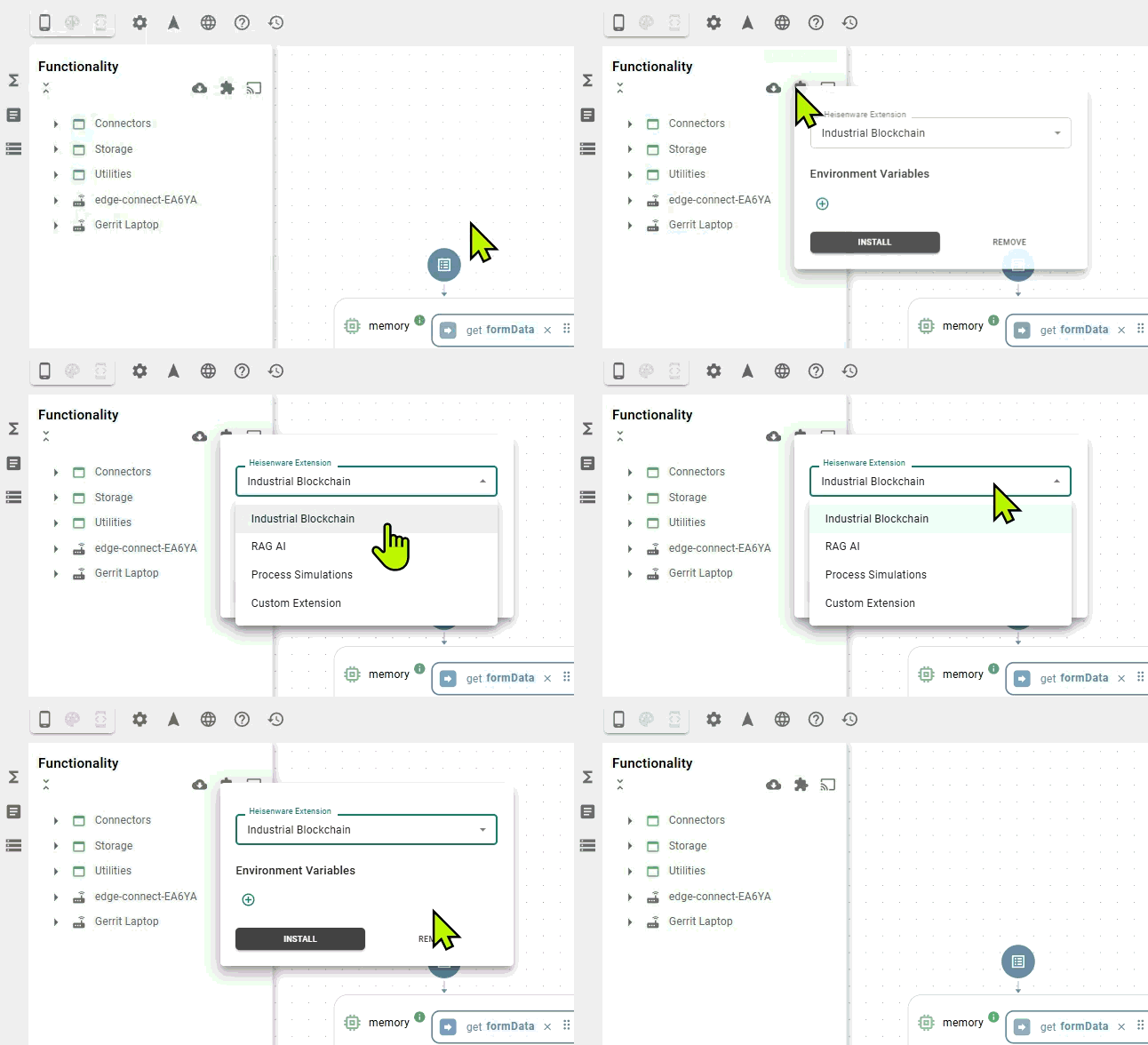
Once installed, these extensions run alongside standard platform services, appearing as selectable blocks in the Function Explorer.

<div align="left"><figure><img src="/files/b83grU7wYOy0Th9Wac5f" alt="" width="485"><figcaption><p>Adding extensions to the App Builder</p></figcaption></figure></div>

## Custom Extensions

Build a custom Docker Extension by wrapping code inside a Code Adapter and loading the image into the platform or running it on your infrastructure. See the [Custom Extensions](/app-builder/build-backend/functions/extensions/custom-extensions.md) guide for deployment steps.


---

# Agent Instructions
This documentation is published with GitBook. GitBook is the documentation platform designed so that both humans and AI agents can read, navigate, and reason over technical content effectively. Learn more at gitbook.com.

## Querying This Documentation
If you need additional information that is not directly available in this page, you can query the documentation dynamically by asking a question.

Perform an HTTP GET request on the current page URL with the `ask` query parameter, and the optional `goal` query parameter:

```
GET https://docs.heisenware.com/app-builder/build-backend/functions/extensions.md?ask=<question>&goal=<endgoal>
```

`ask` is the immediate question: it should be specific, self-contained, and written in natural language.
`goal` is optional and describes the broader end goal you are ultimately trying to accomplish on behalf of the user. GitBook uses it to tailor the answer towards what is most useful for that goal.

The response will contain a direct answer to the question and relevant excerpts and sources from the documentation.

Use this mechanism when the answer is not explicitly present in the current page, you need clarification or additional context, or you want to retrieve related documentation sections.
