# Relational Database

The `Relational Database` class provides a consistent way to interact with SQL databases (PostgreSQL, MySQL, SQLite) without writing raw SQL.

### Quick start: The internal PostgreSQL instance

Heisenware provides a pre-initialized instance called `internal-postgres`. It is globally available and ready for use.  Simply select `internal-postgres` in your function's instance field to start creating tables and managing data.

<p align="center"><img src="https://3495989837-files.gitbook.io/~/files/v0/b/gitbook-x-prod.appspot.com/o/spaces%2FE5Ketpww1s7TauSAJrJ8%2Fuploads%2FPROeyrVc9jFAaWMiQfuz%2Fimage.png?alt=media&#x26;token=7bc92e95-922e-47d2-9d23-5e297fee7718" alt=""></p>

### Connecting an external database

To connect to your own external database, you must use the `create` function. How you configure this depends on where your database is located:

* **Cloud/public database**: If your database is accessible over the internet, you can create the instance directly in your cloud environment.
* **Local database (via Agent)**: If your database is inside a private network (e.g., on a shopfloor server), you must first deploy an [Edge Agent](https://docs.heisenware.com/app-builder/build-backend/functions-library/agents) in that network. You then create the database instance *within* that Agent to establish a secure bridge.

{% hint style="info" %}
**One set of functions**: Whether you are using the internal database or an external connection, the functions for querying, inserting, and managing data are identical.
{% endhint %}

## Connection & Database Management

### **create**

Initializes the database connection. This is the first step for any external database.

{% hint style="success" %}
Skip this step for the  `internal-postgres`. It is already instantiated for you.
{% endhint %}

Parameters

* `options`: An object for configuring the database connection.
  * `dialect`: The database dialect (e.g., `'postgres'`, `'mysql'`).
  * `database`: The name of the database.
  * `username`: The username for authentication.
  * `password`: The password for authentication.
  * `host`: The hostname or IP address of the database server.
  * `port`: The port number.
  * `ssl`: Whether to use SSL. Defaults to `true` for some dialects.

Example

```yaml
# options
dialect: 'postgres'
database: 'mydb'
username: 'user'
password: 'pass'
host: 'localhost'
ssl: true
```

### **isConnected**

Checks if the database connection is currently active. Returns `true` if connected, `false` otherwise.

Output&#x20;

Returns `true` if connected, `false` otherwise.

### **getAllTables**

Retrieves a list of all tables that currently exist in the database.

Output An array of table name strings.

### **reset**

{% hint style="danger" %}
DANGER: This function drops and recreates the entire database, deleting ALL tables and data. Use with extreme caution.
{% endhint %}

Output&#x20;

Returns `true` if the reset was successful.

## Schema & Table Definition

### **defineTable**

Defines a table's schema. If the table doesn't exist, it's created. If it exists, this function will attempt to alter it by adding any new fields.

When creating a table, several fields are automatically added unless you explicitly define an `id` field yourself:

* `id`: A unique `UUID` that serves as the table's primary key.
* `createdAt`: A `date` timestamp recording when the row was created.
* `updatedAt`: A `date` timestamp tracking the last time the row was modified.

Parameters

* `name`: The name of the table (e.g., `'users'`).
* `fields`: An object defining the table's columns.
  * Keys are the field names (must be in camelCase).
  * Values can be a simple string for the data type or an object for more options.
  * Supported data types: `string`, `text`, `integer`, `number`, `boolean`, `date`, `json`, `jsonb`, `file`, `uniquestring`, `uniqueinteger`.
* `options`: An optional object.
  * `trackHistory`: If `true`, a separate history table is created to log all changes to records in this table.

{% hint style="info" %}
As a best practice, use English and camelCase for naming tables and fields (e.g., firstName, dateOfBirth). Avoid **spaces**, **dashes**, and other special characters.
{% endhint %}

{% hint style="info" %}
When using PostgreSQL, we highly recommend the jsonb datatype for JSON data. It's more efficient and allows nested properties to be used in filtering expressions.
{% endhint %}

Example 1: Simple table

```yaml
# name
users
# fields
name: string
email: uniquestring
age: integer
```

Example 2: Table with custom primary key and JSONB

```yaml
# name
products
# fields
id: { type: string, primaryKey: true }
name: string
price: number
specs: jsonb
```

{% hint style="warning" %}
Always use id for the name of the primary key, even when overriding the default. Other names may cause unexpected behavior.
{% endhint %}

#### Advanced Field Configuration

For more control, you can provide an object for a field's value with the following properties:

* `type`: The data type string (e.g., `'string'`, `'integer'`). Required.
* `primaryKey` (boolean): Sets this field as the primary key, overriding the default `id` field.
* `unique` (boolean): Ensures all values in this column are unique. Use `'uniquestring'` or `'uniqueinteger'` as a shorthand.
* `allowNull` (boolean): If `false`, this field must have a value.
* `defaultValue`: Sets a default value if none is provided. Can be a literal (`'active'`, `0`) or a special value (like `'NOW'` for the current time).
* `autoIncrement` (boolean): Automatically increments an integer primary key for each new row.

Example 1: Advanced table with constraints

```yaml
# name
employees
# fields
employeeId: { type: integer, primaryKey: true, autoIncrement: true }
email: { type: string, allowNull: false, unique: true }
status: { type: string, defaultValue: active }
hireDate: { type: date, defaultValue: NOW }
```

Example 2: Unique constraint across multiple columns

To make a combination of fields unique, define an arbitrary string (here: `timeAndId`) that is assigned to the corresponding fields.

```yaml
# name
machineHistory
# fields
machineId: { unique: timeAndId, type: string }
timestamp: { unique: timeAndId, type: date }
data: jsonb
```

### **getTableSchema**

Retrieves the schema definition for a given table.

Parameters

* `name`: The name of the table.

### **deleteTable**

Deletes an entire table and all its data.

Parameters

* `name`: The name of the table to delete.

## Querying and Filtering Data

### **getTableData**

Fetches rows from one or more tables, with powerful options for filtering, joining, sorting, and selecting specific fields. This is the primary function for reading data.

#### Parameters

* `name`: The name of the table (`string`) or an array of table names for a multi-table JOIN query.
* `options`: An optional object to refine the query.
  * `filter`: An array defining the conditions rows must meet. For multi-table queries, this must include the JOIN conditions. See "Filtering Explained" below.
  * `fields`: An array of strings to select specific columns. For multi-table queries, use dot notation (e.g., `'users.name'`).
  * `order`: An array specifying the sort order: `['fieldName', 'DIRECTION']`, where `DIRECTION` is `'ASC'` or `'DESC'`.
  * `limit`: The maximum number of rows to return.
  * `offset`: The number of rows to skip. Useful for pagination.
  * `autoJoin` (boolean): For single-table queries, automatically includes data from related tables. Defaults to `true`.
  * `locale`: A locale string (e.g., `'en-US'`) to format date/time values in the output.
  * `dateStyle` / `timeStyle`: Controls the verbosity of formatted dates (`'full'`, `'long'`, `'medium'`, `'short'`, `'hidden'`).

#### Filtering Explained

The `filter` option uses a special array syntax to build precise queries.

**Simple Conditions**

A simple condition is an array of three elements: `[fieldName, operator, value]`.

* `fieldName`: The name of the column. For `jsonb` fields, use dot notation to access nested keys (e.g., `'specs.dimensions.width'`). For multi-table queries, always prefix with the table name (e.g., `'users.name'`).
* `operator`: A string for the comparison (see table below).
* `value`: The value to compare against.

**Compound Conditions**

Combine conditions using `'and'` or `'or'`:

* AND: `[ [condition1], 'and', [condition2] ]` - Both must be true.
* OR: `[ [condition1], 'or', [condition2] ]` - At least one must be true.

**Available Operators**

| Operator(s)         | Description                                        | Example Value              |
| ------------------- | -------------------------------------------------- | -------------------------- |
| `=`, `eq`, `is`     | Equals                                             | `'John'` or `100`          |
| `<>`, `ne`, `isnot` | Not equals                                         | `'John'` or `100`          |
| `>`, `gt`           | Greater than                                       | `99`                       |
| `>=`, `gte`         | Greater than or equal to                           | `100`                      |
| `<`, `lt`           | Less than                                          | `100`                      |
| `<=`, `lte`         | Less than or equal to                              | `100`                      |
| `contains`          | String field contains the value (case-insensitive) | `'oh'` (matches 'John')    |
| `notcontains`       | String field does not contain the value            | `'Peter'`                  |
| `startswith`        | String field starts with the value                 | `'J'`                      |
| `endswith`          | String field ends with the value                   | `'oe'` (matches 'Doe')     |
| `between`           | Value is between two values in an array            | `[18, 30]` or `['A', 'D']` |
| `in`                | Value is one of several possibilities in an array  | `['active', 'pending']`    |

#### Query Examples

**Example 1: Simple Filter and Field Selection**

*Goal: Get the `name` and `email` for all active users.*

```yaml
# name
users
# options
filter: ['status', '=', 'active']
fields: ['name', 'email']
```

**Example 2: Date Range Filter**

*Goal: Find all orders placed in January 2025.*

```yaml
# name
orders
# options
filter: ['createdAt', 'between', ['2025-01-01', '2025-01-31T23:59:59Z']]
```

**Example 3: Compound 'AND' Filter**

*Goal: Find products that are in stock (`quantity > 0`) and cost more than 50.*

```yaml
# name
products
# options
filter: [ ['quantity', '>', 0], 'and', ['price', '>', 50] ]
```

**Example 4: Sorting and Limiting**

*Goal: Get the 5 most recent high-priority (`'high'` or `'critical'`) tickets.*

```yaml
# name
tickets
# options
filter: ['priority', 'in', ['high', 'critical']]
order: ['createdAt', 'DESC']
limit: 5
```

**Example 5: Multi-Table JOIN**

*Goal: Retrieve the names of users and the titles of the posts they have created.*

```yaml
# name
- users
- posts
# options
# The first filter condition defines the JOIN: users.id must equal posts.userId
filter: [ ['users.id', '=', 'posts.userId'] ]
fields: ['users.name', 'posts.title']
```

**Example 6: JOIN with a `WHERE` Clause**

*Goal: Retrieve the post titles for a specific user named 'Alice'.*

```yaml
# name
- users
- posts
# options
filter: [
  ['users.id', '=', 'posts.userId'],       # JOIN condition
  'and',
  ['users.name', '=', 'Alice']            # WHERE condition
]
fields: ['posts.title']
```

**Example 7: JOIN with Nested `JSONB` Filter**

*Goal: Find all orders for 'Alice' where the shipment was marked as high priority in its `details` JSON field.*

```yaml
# name
- users
- orders
- shipments
# options
fields: ['users.name', 'orders.product', 'shipments.trackingNumber']
filter: [
  ['users.id', '=', 'orders.userId'],                 # Join 1
  'and',
  ['orders.shipmentId', '=', 'shipments.id'],         # Join 2
  'and',
  ['users.name', '=', 'Alice'],                       # Where 1
  'and',
  ['shipments.details.priority', '=', true]           # Where 2 (JSON)
]
```

Output

An array of objects, where each object represents a row that matches the specified criteria.

### **findRow**

Finds and returns the first row that matches the provided filter. Returns `null` if no match is found.

Parameters

* `table`: The name of the table.
* `options`: An object containing a `filter` and optional `fields`.

## Referencing the Current User with the `$USER` Variable

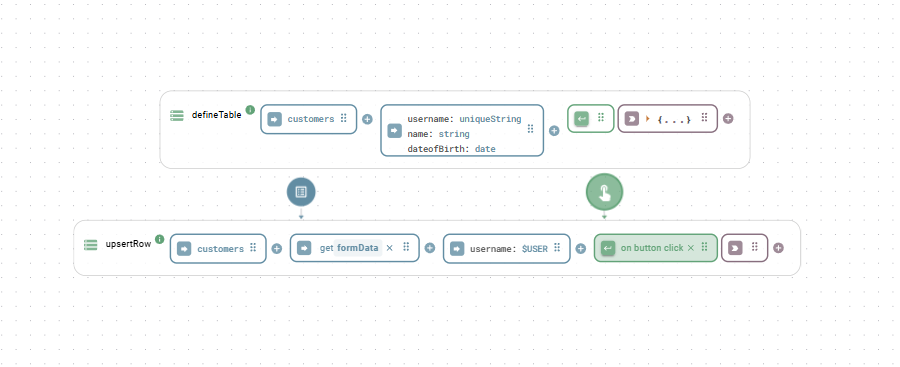
The `$USER` variable enables referencing the current logged-in user in your app, particularly useful for apps requiring user authentication. A recommended practice involves defining the username as a unique key using the data type `uniqueString` when creating the table. This configuration enables utilizing the [`upsertRow`](#inserting-or-updating-a-row) function, capable of both updating and inserting rows based on the existence of the unique key.

<div align="center"><figure><img src="https://3495989837-files.gitbook.io/~/files/v0/b/gitbook-x-prod.appspot.com/o/spaces%2FE5Ketpww1s7TauSAJrJ8%2Fuploads%2FcstC1Rzi34iUkyqAzlmz%2Frelationdat.png?alt=media&#x26;token=dc5386da-2dd9-42fe-9285-ecd70e0387cc" alt=""><figcaption><p>$USER in combination with upsertRow function</p></figcaption></figure></div>

## Data Manipulation (CRUD)

### **addRow**

Adds a single new row to a table.

Parameters

* `table`: The name of the table.
* `data`: An object where keys are column names and values are the data to insert.

Example

```yaml
# table
users
# data
name: Jane Doe
email: jane.doe@example.com
age: 34
```

### **addRows**

Adds multiple rows to a table in a single, efficient bulk operation.

Parameters

* `table`: The name of the table.
* `data`: An array of data objects to insert.

Example

```yaml
# table
products
# data
- name: 'Thingamajig'
  price: 19.99
  stock: 100
- name: 'Widget'
  price: 25.50
  stock: 250
```

### **upsertRow**

Atomically "updates or inserts" a row. It checks for a row's existence and either updates it or creates a new one. By default, it checks using the primary key (`id`). The optional `uniqueKey` parameter lets you use another business key (like an email) for the check.

Parameters

* `table`: The name of the table.
* `data`: The data object to upsert.
* `uniqueKey`: (Optional) An object specifying a unique key for collision detection.

Example 1: Upsert using default primary key (id)

Goal: Update the user with a specific ID, or create them if they don't exist.

```yaml
# table
users
# data
id: 'a1b2c3d4-e5f6-4a3b-8c2d-1f2e3d4c5b6a'
name: Jane Smith
age: 36
```

Example 2: Upsert using a custom unique key (email)

Goal: Find a user by email. If they exist, update their age. If not, create them.

```yaml
# table
users
# data
name: Jane Doe
age: 35
# uniqueKey
email: 'jane.doe@example.com'
```

### **changeRow**

Changes the content of a specific row identified by its primary key.

Parameters

* `table`: The name of the table.
* `id`: The primary key (`id`) of the row to change.
* `data`: An object containing the fields and new values.
* `options`: An optional object.
  * `patch`: If `true`, partially updates nested JSON objects instead of replacing them.

Example: Update a user's age and status

```yaml
# table
users
# id
'a1b2c3d4-e5f6-4a3b-8c2d-1f2e3d4c5b6a'
# data
age: 37
status: 'active'
```

### **updateRow**

Updates specific field of an existing row, based on its primary key. This function essentially behaves like a standard SQL UPDATE.

{% hint style="info" %}
Fields not included in the `data` object are left untouched. For JSON columns, this method **replaces** the entire object with the provided value. To merge data into an existing JSON object, use `patchRow()` instead.
{% endhint %}

Parameters

* `table`: The name of the table.
* `data`: The data object, which must contain the `id` property.

Example

BEFORE: Row in 'settings' table:

```json
{ 
  id: 1, 
  name: 'Config A', 
  settings: { theme: 'dark', notifications: true } 
}
```

Call `updateRow` with the following data:

```yaml
# table
settings
# data
id: 1
settings: {
  notifications: false,
  timezone: UTC
}
```

AFTER: The row is now:

```json
{ 
  id: 1, 
  name: 'Config A', 
  settings: { notifications: false, timezone: 'UTC' } 
}
```

The `name` field was untouched, but the `theme` key in the JSON is gone.

### **patchRow**

Patches a row with new data, intelligently merging nested JSON objects.

{% hint style="info" %}
This method is ideal for partial updates. For JSON columns, it merges the new data into the existing object, preserving any original keys that are not part of the patch.
{% endhint %}

Example

BEFORE: Row in 'settings' table:&#x20;

```json
{ 
  id: 1, 
  name: 'Config A', 
  settings: { theme: 'dark', notifications: true } 
}
```

Call `patchRow` with the following data:

```yaml
# table
settings
# data
id: 1
settings: {
  notifications: false,
  timezone: UTC
}
```

AFTER: The row is now:&#x20;

```json
{ 
  id: 1, 
  name: 'Config A', 
  settings: { theme: 'dark', notifications: false, timezone: 'UTC' } 
}
```

The original `theme` key is preserved, and the new data is merged in.

### **deleteRow**

Deletes a single row from a table identified by its primary key.

Parameters

* `table`: The name of the table.
* `id`: The primary key of the row to delete.

Example

```yaml
# table
users
# id
'a1b2c3d4-e5f6-4a3b-8c2d-1f2e3d4c5b6a'
```

### **clearTable**

Deletes all rows from a table, but leaves the table structure intact.

Parameters

* `name`: The name of the table to clear.

Example

```yaml
# name
logs
```

## Relationships and Associations

These functions allow you to define the logical connections between your tables, creating a relational data model. Establishing relationships is key to ensuring data integrity and enabling powerful, cross-table queries. The typical workflow is a three-step process:

1. Define Tables: Create your tables using `defineTable`.
2. Define the Relationship: Use one of the association functions (`mandatorilyHasOne`, etc.) to tell the database how the tables are connected.
3. Link Records: Use the foreign key fields created in step 2 to connect specific rows. For many-to-many relationships, you'll use the `associateRow` function.

### **optionallyHasOne**

Creates a one-to-many relationship where the child record can exist without being linked to a parent record. This is achieved by creating a foreign key column that is nullable (can be empty).

* Hint: "A `child` has zero or one `parent`. A `parent` may have many `children`."

Parameters

* `childTable`: The name of the table that will receive the foreign key (e.g., `'posts'`).
* `parentTable`: The name of the table being referenced (e.g., `'users'`).
* `role`: (Optional) A string in `PascalCase` (e.g., `'Owner'`) used to create a distinct relationship when there are multiple connections between the same two tables.

### **mandatorilyHasOne**

Creates a one-to-many relationship where the child record cannot exist without being linked to a parent record. This creates a foreign key column that is non-nullable (must have a value).

* Hint: "A `child` must have exactly one `parent`. A `parent` may have many `children`."

Parameters

* `childTable`: The name of the table that will receive the foreign key (e.g., `'employees'`).
* `parentTable`: The name of the table being referenced (e.g., `'companies'`).
* `role`: (Optional) A string in `PascalCase` (e.g., `'Manager'`) used to create a distinct relationship.

### **optionallyHasMany**

Creates a many-to-many relationship between two tables. This automatically generates a hidden "junction" or "join" table to manage the complex associations.

* Hint: "A `child` can have many `parents`. A `parent` can have many `children`."

Parameters

* `childTable`: The name of the first table in the relationship.
* `parentTable`: The name of the second table in the relationship.

### **associateRow**

Links existing records together. This function is primarily used to create and manage the links for a many-to-many relationship after it has been defined.

Parameters

* `sourceTable`: The name of the source table.
* `sourceId`: The ID of the row in the source table.
* `targetTable`: The name of the target table.
* `targetId`: The ID (`string`) or an array of IDs (`array of strings`) of the row(s) in the target table.

### Relationship Strategies and Examples

This section provides a practical guide to choosing and implementing the correct relationship for your data model.

#### **One-to-Many (Mandatory)**

This is the most common type of relationship. Use it when a record (the "child") would be meaningless or invalid without its corresponding owner (the "parent").

**Scenario**: An `employee` must belong to a `company`. An employee record cannot exist in the database without being assigned to a company.

{% stepper %}
{% step %}
**Define tables**

First, create the companies and employees tables.

```yaml
# (call defineTable)
# name
companies
# fields
name: string

# (call defineTable)
# name
employees
# fields
firstName: string
lastName: string
```

{% endstep %}

{% step %}
Define the relationships

Next, declare that an employee mandatorily has one company.

```yaml
# (call mandatorilyHasOne)
# childTable
employees
# parentTable
companies
```

{% hint style="info" %}
This action adds a non-nullable `companyId` foreign key column to the `employees` table.
{% endhint %}
{% endstep %}

{% step %}
Link Records

Because the companyId is mandatory, you must provide it when creating a new employee record.

```yaml
# (call addRow)
# table
employees
# data
firstName: Ada
lastName: Lovelace
# You must provide the ID of an existing company
companyId: 'a1b2c3d4-e5f6-4a3b-8c2d-1f2e3d4c5b6a'
```

{% endstep %}
{% endstepper %}

#### **One-to-Many (Optional)**

Use this relationship when the link between a child and a parent is optional. The child record can be created first and linked to the parent at a later time.

**Scenario**: A blog `post` can optionally be assigned to a `category`. A post can exist without a category.

{% stepper %}
{% step %}
Define Tables

```
# (call defineTable)
# name
posts
# fields
title: string
content: text

# (call defineTable)
# name
categories
# fields
name: string
```

{% endstep %}

{% step %}
Define the Relationship

Declare that a post optionally has one category.

```yaml
# (call optionallyHasOne)
# childTable
posts
# parentTable
categories
```

{% hint style="info" %}
This adds a nullable `categoryId` foreign key column to the `posts` table.
{% endhint %}
{% endstep %}

{% step %}
Link Records

You can create a post without a category. Later, you can link it by updating the record.

```yaml
# (call addRow to create the post initially)
# table
posts
# data
title: 'My First Post'
content: '...'
# categoryId is not needed here

# (call patchRow later to link it to a category)
# table
posts
# data
id: 'f1e2d3c4-b5a6-4a3b-8c2d-1f2e3d4c5b6a' # ID of the post
categoryId: 'c1b2a3d4-e5f6-4a3b-8c2d-1f2e3d4c5b6a' # ID of the category
```

{% endstep %}
{% endstepper %}

#### **Many-to-Many**

Use this when records in two tables can have multiple links to each other.

**Scenario**: An `order` can contain many `products`, and a `product` can be included in many different `orders`.

{% stepper %}
{% step %}
Define Tables

```
# (call defineTable)
# name
orders
# fields
orderDate: date

# (call defineTable)
# name
products
# fields
name: string
price: number
```

{% endstep %}

{% step %}
Define the Relationship

Declare the many-to-many relationship between orders and products.

```yaml
# (call optionallyHasMany)
# childTable
orders
# parentTable
products
```

{% hint style="info" %}
This automatically creates a hidden "junction table" (e.g., `__orders2products`) to store the links between order IDs and product IDs.
{% endhint %}
{% endstep %}

{% step %}
Link Records

To connect the records, you must use the associateRow function. You can link one order to multiple products by providing an array of product IDs.

```yaml
# (call associateRow)
# sourceTable
orders
# sourceId
'o1d2e3r4-b5a6-4a3b-8c2d-1f2e3d4c5b6a' # ID of the order
# targetTable
products
# targetId is an array of product IDs
- 'p1r2o3d4-b5a6-4a3b-8c2d-1f2e3d4c5b6a'
- 'p5r6o7d8-b5a6-4a3b-8c2d-1f2e3d4c5b6a'
```

{% endstep %}
{% endstepper %}

#### **Advanced: Multiple Relationships with Roles**

Use the `role` parameter when you need to define more than one distinct relationship between the same two tables.

**Scenario**: A `document` has both an `owner` and an `editor`. Both the owner and the editor are records from the `users` table.

{% stepper %}
{% step %}
Define Tables

```
# (call defineTable)
# name
users
# fields
name: string

# (call defineTable)
# name
documents
# fields
title: string
```

{% endstep %}

{% step %}
Define Relationships (with Roles)

Create two distinct one-to-many relationships, specifying a role for each.

```yaml
# (call optionallyHasOne for the Owner)
# childTable
documents
# parentTable
users
# role
Owner

# (call optionallyHasOne for the Editor)
# childTable
documents
# parentTable
users
# role
Editor
```

{% hint style="info" %}
This adds two separate foreign keys to the `documents` table: `ownerId` and `editorId`. The role name directly determines the name of the foreign key.
{% endhint %}
{% endstep %}

{% step %}
Link Records

When creating a document, you can now provide IDs for both the owner and the editor using the specific foreign key fields.

```yaml
# (call addRow)
# table
documents
# data
title: 'Q4 Financial Report'
ownerId: 'u1s2e3r4-b5a6-4a3b-8c2d-1f2e3d4c5b6a'  # A user's ID
editorId: 'u5s6e7r8-b5a6-4a3b-8c2d-1f2e3d4c5b6a' # A different user's ID
```

{% endstep %}
{% endstepper %}

## Audit Logging

The `Database` class features a robust, built-in Audit Logging system. This feature replaces the legacy history tracking (`trackHistory`) and is designed to create a secure, detailed, and queryable trail of all data changes.

Audit logs track exactly what changed, when it changed, and who changed it. It automatically calculates the differences (`diff`) between old and new values for updates, and stores full snapshots for creations and deletions.

{% hint style="warning" %}
**Deprecation Notice**

The `trackHistory` option in `defineTable` and the `getHistoricalData` function are deprecated as of February 2025. Please use `auditLog` and `getAuditLog` for all future implementations.
{% endhint %}

#### Enabling Audit Logs

To enable audit logging for a table, set the `auditLog` option to `true` when defining the table schema using the `defineTable` function.

```yaml
# name
orders
# fields
orderNumber: string
status: string
total: number
# options
auditLog: true
```

When enabled, the database automatically creates a hidden, parallel table (e.g., `ordersAuditLog`) that securely records all `CREATE`, `UPDATE`, and `DELETE` actions performed on the main table.

#### Tracking the Actor (`actorId`)

To know *who* made a change, all data manipulation functions (such as `addRow`, `updateRow`, `patchRow`, `upsertRow`, and `deleteRow`) now accept an optional `actorId` within their options object.

In a typical Heisenware application, you will want to bind this to the currently authenticated user using the `$USER` variable or their specific user ID.

Example: Updating a row and logging the actor

```yaml
# table
orders
# data
id: 'order-123'
status: 'shipped'
# options
actorId: 'admin-alice'
```

#### Retrieving Audit Logs (`getAuditLog`)

The `getAuditLog` function allows you to retrieve and filter the recorded history. It provides powerful filtering capabilities, including natural language time parsing (e.g., 'yesterday', '-1h') and field-level tracking.

Parameters

* `table`: The name of the table to query (e.g., `'orders'`).
* `options`: An object for filtering the logs.
  * `id`: Filters logs for a specific record's primary key.
  * `actorId`: Filters logs by the user who made the change.
  * `action`: Filters by the specific action type (`'CREATE'`, `'UPDATE'`, or `'DELETE'`).
  * `changedField`: Only returns logs where a specific field was modified.
  * `start`: Earliest time to include (can be natural language like `'yesterday'` or `'-1h'`).
  * `stop`: Latest time to include. Defaults to `'now'`.

**Example 1: View all changes to a specific record**

*Goal: See the complete lifecycle of order 'order-999'.*

```yaml
# table
orders
# options
id: 'order-999'
```

**Example 2: Track specific field modifications**

*Goal: Find out who changed the 'status' field of an order, and when.*

```yaml
# table
orders
# options
id: 'order-999'
changedField: status
```

**Example 3: Monitor user activity**

*Goal: See all deletions performed by a specific admin in the last 24 hours.*

```yaml
# table
products
# options
action: DELETE
actorId: admin-alice
start: -24h
```

#### Understanding the Log Structure

The `getAuditLog` function returns an array of log entries, ordered from newest to oldest. The most important part of the log is the `diff` object, which varies depending on the `action`:

1\. CREATE

When a record is created, there is no "old" state. The `new` property contains the complete inserted record.

```json
{
  "action": "CREATE",
  "actorId": "admin-alice",
  "diff": {
    "old": null,
    "new": { "id": "order-123", "status": "pending", "total": 150.00 }
  },
  "createdAt": "2025-08-20T10:00:00.000Z"
}
```

2\. UPDATE

When a record is updated, the `diff` object *only* contains the fields that actually changed, showing both their `old` and `new` values.

```json
{
  "action": "UPDATE",
  "actorId": "admin-alice",
  "diff": {
    "status": {
      "old": "pending",
      "new": "shipped"
    }
  },
  "createdAt": "2025-08-21T14:30:00.000Z"
}
```

3\. DELETE

When a record is deleted, there is no "new" state. The `old` property contains the final snapshot of the record before it was destroyed, allowing for potential data recovery.

```json
{
  "action": "DELETE",
  "actorId": "admin-alice",
  "diff": {
    "old": { "id": "order-123", "status": "shipped", "total": 150.00 },
    "new": null
  },
  "createdAt": "2025-08-25T09:15:00.000Z"
}
```

## "Magic" Functions (Auto-Schema)

These functions create and alter tables on the fly. Use them for rapid prototyping or when dealing with unpredictable data structures.

**autoUpsertRow**

Upserts a row. If the table or columns don't exist, they're created automatically based on the provided data.

Parameters

* `table`: The name of the table.
* `data`: The data object to upsert.
* `uniqueKey`: An optional unique key for collision detection.

### **autoAddRows**

Bulk-inserts data. Like `autoUpsertRow`, it creates or alters the table schema as needed based on the first data object in the array.

Parameters

* `table`: The name of the table.
* `data`: An array of data objects to insert.